
ChatGPT + MCapital
Indian stock research, inside ChatGPT.
Connect ChatGPT to Indian equity market data and research through MCapital. Explore companies and market developments, investigate ideas and build on each answer with further analysis.
Already connected? Try a research prompt.
Requirements
Before you start.
A MCapital account
Create an account or log in above. Your existing plan decides which research you can access; usage limits are shown in your account.
Access to ChatGPT's custom connectors
Use ChatGPT on the web with permission to add custom MCP servers. Your account or workspace must allow custom apps; organization security settings can restrict access.
The connector URL
Use the HTTPS URL below. Sign in through OAuth when prompted; you do not need to copy an API key into the form.
What does MCP access cost, and what are the limits?
Free MCapital account
500 tool calls per 24-hour limit window
Market-data tools and research designated for Free access.
Premium MCapital account
5,000 tool calls per 24-hour limit window
Market-data tools plus Premium research while the subscription is active.
One question can make several tool calls. OAuth connections share an account's allowance across connected apps; personal API keys are limited per key. These are the configured allowances reviewed on 4 Nov 2026. There is no separate MCP purchase step: the connected MCapital account determines research access. Your AI provider's plan requirements and limits are separate.
Step by step
Connect MCapital to ChatGPT.
Remote MCP server URL
https://api.mcapital.in/mcp- 1
Open the custom MCP server form
Go to ChatGPT's Plugins page. Open the Add or plus menu and choose Add custom MCP server. Some accounts show Create MCP App instead.
- 2
Enter the MCapital connection details
Use MCapital as the name. Under Connection, choose Server URL and paste the connector URL shown above. Select OAuth for authentication. Leave manually supplied client ID and secret empty so ChatGPT can register the connection automatically.
- 3
Create the plugin and approve access
Review the custom-server notice, confirm that you want to continue, and select Create as a plugin. When MCapital opens, log in or create an account, review the requested access and choose Allow.
- 4
Install it and start a conversation
Find MCapital in your personal or workspace plugins and install it if prompted. Open a chat and select or enable MCapital from the chat's tools menu. Ask your first question using the prompt below.
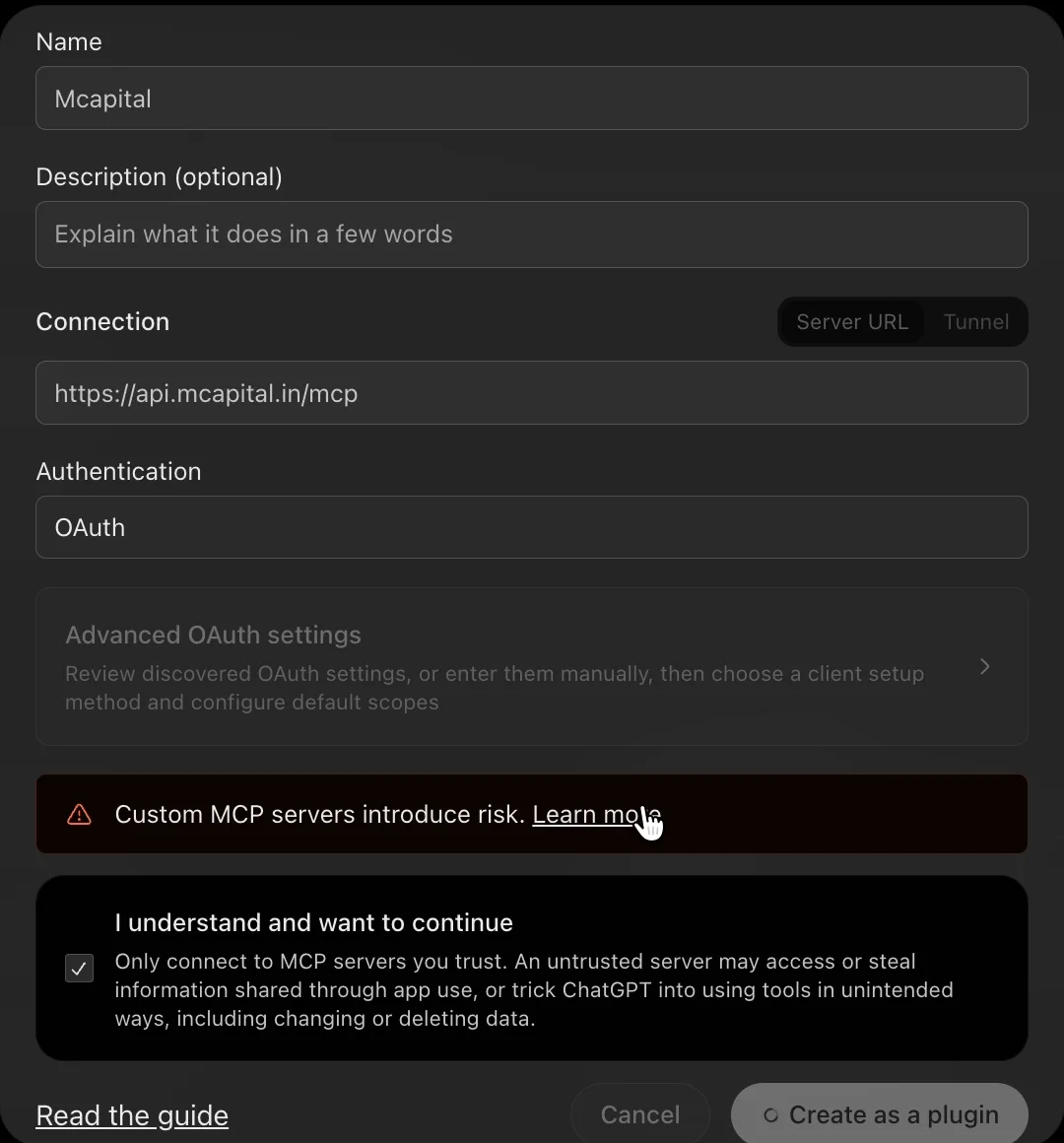
Instructions checked against provider documentation on 4 Nov 2026. Interface labels and account availability can change. See OpenAI's custom MCP server guide for current provider requirements.
Put the connection to work
Compare three Indian companies
Copy this into a conversation with MCapital enabled:
Use MCapital to compare TCS, Infosys and HCL Technologies. Show the latest available revenue growth, operating margin, ROE and P/E side by side. State the reporting period and data date for each figure, explain any missing data, and link to sources. What differences deserve further research?
Check that the connection worked
Look for MCapital tool activity and an answer that identifies the companies, periods and data dates. If the answer only uses general knowledge, explicitly ask ChatGPT to use the MCapital plugin and retrieve the figures again.
Then keep digging
- Which company's growth and margins changed most over the last three reported years?
- Check recent corporate filings for these companies. Which developments could change the comparison?
- Explain the valuation differences without treating a lower P/E as an automatic buy signal.
These are research prompts, not stock recommendations. Coverage varies. Verify dates, source disclosures and important figures before relying on an AI answer.
Worked example · company comparison
TCS, Infosys and HCL Technologies: the returned data.
We ran MCapital's compare_companies tool for TCS, INFY and HCLTECH. This is an editorial presentation of the actual MCP response retrieved on 4 Nov 2026, not a simulated answer or a live table. All three returned consolidated fundamentals.
| Metric | Tata Consultancy ServicesNSE: TCS | InfosysNSE: INFY | HCL TechnologiesNSE: HCLTECH |
|---|---|---|---|
| Revenue growth, YoY | 11.2%Quarter: Sep 2026 | 10.7%Quarter: Sep 2026 | 11.5%Quarter: Sep 2026 |
| Operating margin | 26%Quarter: Sep 2026 | 24%Quarter: Sep 2026 | 21%Quarter: Sep 2026 |
| Return on equity | 52%Year ended Mar 2026 | 32%Year ended Mar 2026 | 24%Year ended Mar 2026 |
| Price / earnings | 16.6xValuation: 30 Oct 2026 | 15.2xValuation: 30 Oct 2026 | 20.4xValuation: 30 Oct 2026 |
On a phone, scroll the table sideways to see all three companies. Figures retain the precision returned by the tool.
How to read this comparison
In this snapshot, TCS has the highest returned operating margin and annual ROE. HCL Technologies has the highest quarterly revenue growth, while Infosys has the lowest returned P/E. These are different measures, not a buy ranking. The quarter, fiscal year and valuation date should remain visible when comparing them.
What the numbers mean
Quarterly revenue growth compares with the same quarter a year earlier. Operating margin is operating profit divided by sales, while ROE refers to the latest fiscal year. P/E uses trailing earnings and has its own valuation date. Open the linked company pages for more financial and valuation context, or ask MCapital to explain a metric.
A useful follow-up
“Check whether any company filed newer results than these tables include. Then compare three years of cash flow and explain what the headline margins leave out.” This moves the conversation from a static comparison to checking the quality and freshness of its evidence.
Make it your research
Take your analysis in different directions.
Start with the question you want to investigate. With MCapital connected to ChatGPT, you can combine different parts of the Indian equity market in one research workflow. These prompts are starting points; adapt the company, criteria, period and follow-up questions to your purpose.
Build a company research brief
Bring financial performance, valuation, ownership and recent developments together.
Use MCapital to prepare a research brief on Larsen & Toubro. Cover its latest available financial performance, cash flow, valuation, shareholding and recent company disclosures. Identify the main questions that deserve closer investigation. State reporting periods and data dates, separate reported facts from interpretation and flag missing information.
Compare businesses and industry peers
Understand how companies differ and which metrics make the comparison useful.
Use MCapital to compare TCS, Infosys and HCL Technologies on growth, profitability, cash flow, valuation and ownership. Add industry context where available. Explain differences in reporting periods or accounting basis, and identify what the headline numbers leave out. Treat the comparison as a starting point for research rather than a buy ranking.
Screen and investigate investment ideas
Turn your own criteria into a shortlist, then examine the underlying businesses.
Use MCapital to screen Indian listed companies for improving revenue, positive operating cash flow and manageable leverage using the available metrics. Show the exact filters and reporting periods used. For a small shortlist, investigate recent disclosures and explain what could challenge the initial screening result. Do not fill missing values with estimates.
Understand a market development
Follow a disclosure through to its business context and the questions it raises.
Use MCapital to find recent significant company announcements and credit rating actions. For each, explain what was disclosed, the relevant date and what it could mean for the business. Link to the original documents, distinguish facts from interpretation and suggest useful follow-up questions. If discussing price movements, do not assume that the disclosure caused the move.
Explore IPOs and published research
Review issue information alongside any MCapital research your account can access.
Use MCapital to review currently available mainboard and SME IPOs. Summarize issue dates and available issue information, then identify any published MCapital notes or recommendations my account can access. Keep IPO facts, our published research and your own interpretation distinct. State when the information was updated and flag gaps.
Explore historical scenarios and strategy rules
Use historical prices for performance analysis, portfolio scenarios, simulations or strategy tests.
Use MCapital to retrieve the available daily price history for TCS over the last three years. Confirm the date range, missing observations and treatment of splits and dividends. Using your analysis or coding tools, compare a 20-day/50-day moving-average crossover strategy with buy-and-hold. Decide signals after the close and execute on the next session. Include transaction costs and slippage, state assumptions, and report total return, maximum drawdown and number of trades. Separate in-sample and out-of-sample periods. Explain unavailable data or calculation tools rather than inventing results.
Availability varies by company, dataset and account access. Your assistant's analysis or coding tools perform calculations using the retrieved data. Check the reporting dates, evidence and assumptions behind an answer; historical tests and simulations do not guarantee future returns.
If you get stuck
A few things to check.
I cannot find Add custom MCP server
Check your ChatGPT account and workspace permissions. In an older interface, look under Settings → Apps (or Apps & Connectors) → Advanced settings → Developer mode, then create a custom app. If your workspace restricts custom apps, ask its administrator.
The connection asks for an API key
For this ChatGPT setup, choose OAuth rather than a static key. Use the exact HTTPS connector URL. Personal API keys in your MCapital account are for code clients and scripts.
The plugin is connected but not being used
Install or enable MCapital in the conversation, then name it in your prompt. If authorization has expired, reconnect from the plugin settings and approve access again.
I can connect, but some research or data is unavailable
Check the account you authorized and its plan and usage limits. Premium research needs the corresponding MCapital access. A missing company metric may simply be unavailable; ask the assistant to mark it as missing rather than estimate it.
How do I disconnect?
Open MCapital Account → Use our data in AI assistants → Connected AI apps and disconnect the app. You can also remove the connection from your assistant's settings. You will need to approve access again to reconnect.