
Claude + MCapital
Indian stock research, inside Claude.
Bring Indian equity market data and research into Claude with MCapital. Ask about companies, sectors and market developments, then follow the evidence wherever your research takes you.
Already connected? Try a research prompt.
Requirements
Before you start.
A MCapital account
Create an account or log in above. Your existing plan decides which research you can access; usage limits are shown in your account.
Access to Claude's custom connectors
Use a Claude account that can add custom connectors. Free accounts have a limited number of custom connectors. On Team and Enterprise workspaces, an owner or authorized administrator may need to add the connector first.
The connector URL
Use the HTTPS URL below. Sign in through OAuth when prompted; you do not need to copy an API key into the form.
What does MCP access cost, and what are the limits?
Free MCapital account
500 tool calls per 24-hour limit window
Market-data tools and research designated for Free access.
Premium MCapital account
5,000 tool calls per 24-hour limit window
Market-data tools plus Premium research while the subscription is active.
One question can make several tool calls. OAuth connections share an account's allowance across connected apps; personal API keys are limited per key. These are the configured allowances reviewed on 4 Nov 2026. There is no separate MCP purchase step: the connected MCapital account determines research access. Your AI provider's plan requirements and limits are separate.
Step by step
Connect MCapital to Claude.
Remote MCP server URL
https://api.mcapital.in/mcp- 1
Add a custom connector
Open Claude's Customize → Connectors (called Settings → Connectors in some versions). Choose Add, then Add custom connector. Workspace owners may see Custom → Web in organization connector settings.
- 2
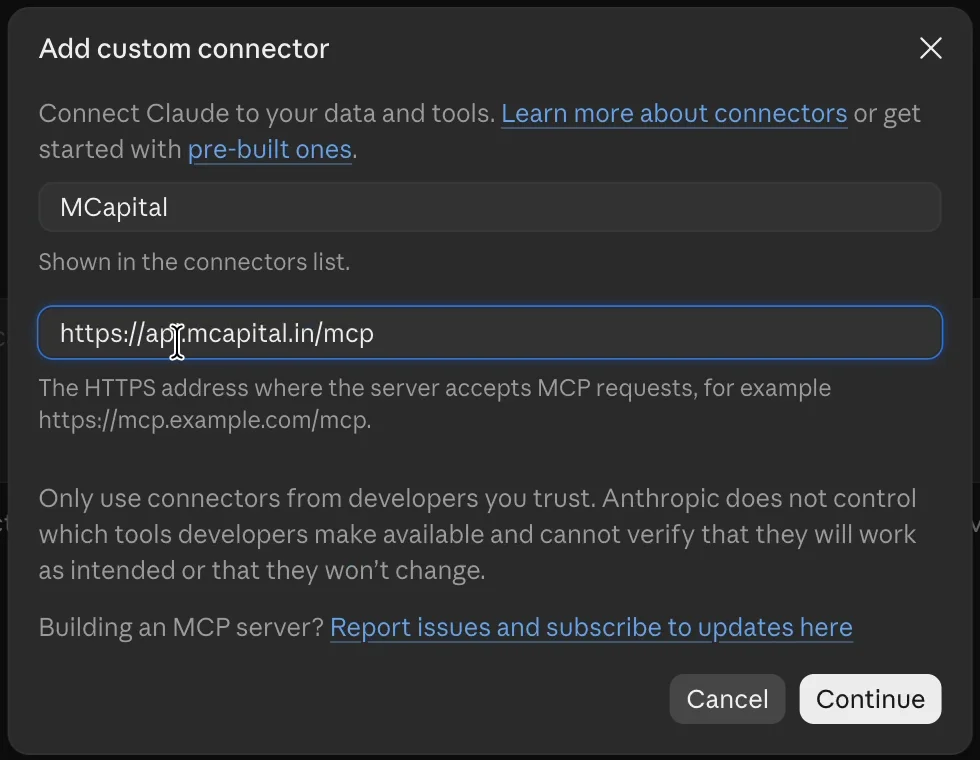
Enter the name and server URL
Name the connector MCapital and paste the connector URL shown above into the remote MCP server URL field. Continue so Claude can detect the server's sign-in settings.
- 3
Sign in and allow the connection
Choose the detected OAuth sign-in flow and automatic client registration if a client setup choice is shown. You do not need to supply a personal API key or client secret. Complete Add or Connect, then sign in to MCapital, review the access and click Allow.
- 4
Enable MCapital in your chat
Start a conversation. Open the + menu, choose Connectors and turn on MCapital. Ask the research question below. Approve the requested read tools when Claude asks.
Instructions checked against provider documentation on 4 Nov 2026. Interface labels and account availability can change. See Claude's custom connector guide for current provider requirements.
Put the connection to work
Investigate early signs of credit stress
Copy this into a conversation with MCapital enabled:
Use MCapital to find Indian listed companies with credit rating downgrades or outlook cuts in the last 30 days. Show the company, agency, action, date and source link. For each, check recent corporate filings for missed payments, auditor concerns or management exits. Distinguish confirmed disclosures from your interpretation and flag missing information.
Check that the connection worked
Claude should call MCapital's tools before answering. Expect dated rating actions and filing links, with a clear separation between reported facts and the assistant's interpretation. The companies and results will change as new disclosures arrive.
Then keep digging
- Which three cases deserve a closer review, and what evidence supports that priority?
- For the first company, compare the rating action with its recent financials and cash flow.
- Did the share price move around the disclosure date? Show the dates without assuming the filing caused the move.
These are research prompts, not stock recommendations. Coverage varies. Verify dates, source disclosures and important figures before relying on an AI answer.
Worked example · rating to disclosure
Investigating a real credit rating change.
We used get_market_events to retrieve downgrades from the previous 30 days, then get_company for the company's ratings, financials and filings. The following case came from actual MCP responses retrieved on 4 Nov 2026. This written walkthrough explains the evidence; it is not a transcript of a Claude answer.
Archean Chemical Industries
- Rating agency
- CRISIL
- Action date
- 21 Oct 2026
- Previous rating and outlook
- Crisil A / Negative
- New rating and outlook
- Crisil A- / Stable
- Rated bank facilities
- ₹ 1,531 Cr.
Read the agency's reason, then check subsequent filings
CRISIL cited weaker-than-expected operating performance and debt-funded semiconductor expansion among its concerns. The grade was cut even though the outlook changed from Negative to Stable. The grade and outlook describe different aspects of the rating, so reporting only “Stable” would miss the downgrade.
That rationale is dated 21 Oct 2026. It should not be treated as a complete account of everything disclosed afterward. The next step is to open the company's later filings and distinguish reported developments from an assistant's interpretation.
The freshness check caught something important
The financial tables in this example ended at Jun 2026, while MCapital also flagged a newer results-related filing from 2 Nov 2026. That distinction matters: the period shown in a table may differ from the period covered by a more recent company disclosure.
A careful answer should disclose that mismatch and read the newer document before describing the company's latest financial position. Ask: “Use the newer filing to update the analysis. Keep its figures separate from the older standardized tables and identify their reporting periods.”
This is a dated research example, not a current credit assessment or a recommendation to transact. The original agency rationale and company disclosures take precedence over AI summaries. A price move around a filing does not establish causation.
Make it your research
Take your analysis in different directions.
Start with the question you want to investigate. With MCapital connected to Claude, you can combine different parts of the Indian equity market in one research workflow. These prompts are starting points; adapt the company, criteria, period and follow-up questions to your purpose.
Build a company research brief
Bring financial performance, valuation, ownership and recent developments together.
Use MCapital to prepare a research brief on Larsen & Toubro. Cover its latest available financial performance, cash flow, valuation, shareholding and recent company disclosures. Identify the main questions that deserve closer investigation. State reporting periods and data dates, separate reported facts from interpretation and flag missing information.
Compare businesses and industry peers
Understand how companies differ and which metrics make the comparison useful.
Use MCapital to compare TCS, Infosys and HCL Technologies on growth, profitability, cash flow, valuation and ownership. Add industry context where available. Explain differences in reporting periods or accounting basis, and identify what the headline numbers leave out. Treat the comparison as a starting point for research rather than a buy ranking.
Screen and investigate investment ideas
Turn your own criteria into a shortlist, then examine the underlying businesses.
Use MCapital to screen Indian listed companies for improving revenue, positive operating cash flow and manageable leverage using the available metrics. Show the exact filters and reporting periods used. For a small shortlist, investigate recent disclosures and explain what could challenge the initial screening result. Do not fill missing values with estimates.
Understand a market development
Follow a disclosure through to its business context and the questions it raises.
Use MCapital to find recent significant company announcements and credit rating actions. For each, explain what was disclosed, the relevant date and what it could mean for the business. Link to the original documents, distinguish facts from interpretation and suggest useful follow-up questions. If discussing price movements, do not assume that the disclosure caused the move.
Explore IPOs and published research
Review issue information alongside any MCapital research your account can access.
Use MCapital to review currently available mainboard and SME IPOs. Summarize issue dates and available issue information, then identify any published MCapital notes or recommendations my account can access. Keep IPO facts, our published research and your own interpretation distinct. State when the information was updated and flag gaps.
Explore historical scenarios and strategy rules
Use historical prices for performance analysis, portfolio scenarios, simulations or strategy tests.
Use MCapital to retrieve the available daily price history for TCS over the last three years. Confirm the date range, missing observations and treatment of splits and dividends. Using your analysis or coding tools, compare a 20-day/50-day moving-average crossover strategy with buy-and-hold. Decide signals after the close and execute on the next session. Include transaction costs and slippage, state assumptions, and report total return, maximum drawdown and number of trades. Separate in-sample and out-of-sample periods. Explain unavailable data or calculation tools rather than inventing results.
Availability varies by company, dataset and account access. Your assistant's analysis or coding tools perform calculations using the retrieved data. Check the reporting dates, evidence and assumptions behind an answer; historical tests and simulations do not guarantee future returns.
If you get stuck
A few things to check.
I cannot add a custom connector
Check your connector allowance and workspace permissions. A Free account may already be using its custom connector slot. On a managed workspace, an owner or authorized administrator needs to add MCapital before members can connect.
Claude asks for authentication settings
Use the server's detected OAuth sign-in. If automatic OAuth client registration is offered, choose it. Leave fixed request headers and manually supplied API credentials empty for this connection.
Claude answers without using MCapital
Turn on MCapital under + → Connectors in this conversation and ask explicitly to use it. If the connection has expired, reconnect in connector settings and sign in again.
I can connect, but some research or data is unavailable
Check the account you authorized and its plan and usage limits. Premium research needs the corresponding MCapital access. A missing company metric may simply be unavailable; ask the assistant to mark it as missing rather than estimate it.
How do I disconnect?
Open MCapital Account → Use our data in AI assistants → Connected AI apps and disconnect the app. You can also remove the connection from your assistant's settings. You will need to approve access again to reconnect.